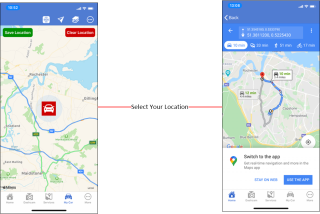
My Car location |
This feature allows you to save your location when you park your vehicle and then get navigational instructions when you want to return. This is especially useful if you are parking your vehicle as an Airport, large car park or in an area you are unfamiliar with.
This screen has additional features which you might find useful |
|
When you arrive at the location push the save location button and then leave your vehicle and use your phone normally, when you are ready to return click the red car icon this will prompt you to get navigational directions to return to your vehicle, the navigational information shown offers you the choice of either walking, bus/train, driving should you be with someone else in their vehicle or bicycle.
1. Save vehicle location
2. Touch the red icon on the map
3. Select navigation back to your vehicle |